

Schlumberger
via TNBI Solutions
AI-Powered Part Identification System
to boost user satisfaction by 62%
OUTCOMES AT A GLANCE
2.4x
Faster workflows for users
87
System Usability Score
40%
Boost in task Completion Rate
Introduction
CONTEXT
Schlumberger partnered with TNBI Solutions to design a hardware–software system capable of identifying visually similar industrial parts within seconds. The solution combined computer vision, weight sensors, and a desktop interface to reduce manual catalog searching and operational delays in warehouse environments.
DURATION
Dec '21 - Jul '22
ROLE
Jr UI/UX Designer (Me)
3 UI/UX Designers
Project Manager
RESPONSIBILITIES
Interaction states
Desktop UI screens
/////
PRIMARY USERS
Warehouse operators
Manufacturing technicians
Quality-control staff
USAGE CONTEXT
Industrial facilities
Gloves, limited time, high cognitive load
Repetitive tasks
Desktop-based workflows connected to physical machinery
Process
THE PROBLEM
In Schlumberger’s warehouses, workers handle thousands of metal components. Many parts:
Look visually similar
Have small but critical differences
Are difficult to distinguish without experience
Before this system:
Workers manually searched catalogs
Identification took several minutes
Only highly experienced employees could do it reliably
Mistakes caused incorrect labeling and production delays
THE CORE CHALLENGE
Student workers on campus juggling multiple on-campus jobs faced manual calculations, confusing terminology, and poor mobile experiences—leading to compliance anxiety and low adoption.
How might we help operators identify the correct part quickly, with confidence, even if they are not experts?
UNDERSTANDING THE CONTEXT
This was not a consumer app.
The system was used in industrial environments, under time-constraints, by operators wearing gloves.
This meant that the UI had to be:
Extremely clear
Fast to understand
Resistant to human error
Functional over decorative
DESIGN GOALS
From early discussions with the product and engineering teams, we aligned on four UX goals:
01
Minimize Cognitive Load
during scanning & review
02
Support fast decision making
with clear visual hierarchy
03
Seamlessly connect hardware & software
workflows
MY ROLE
As a Junior UI/UX Designer, I worked closely with senior designers and engineers to focus specifically on how operators interact with the system
UX Process & Key Decisions
GRANULAR DESIGN DECISION #1
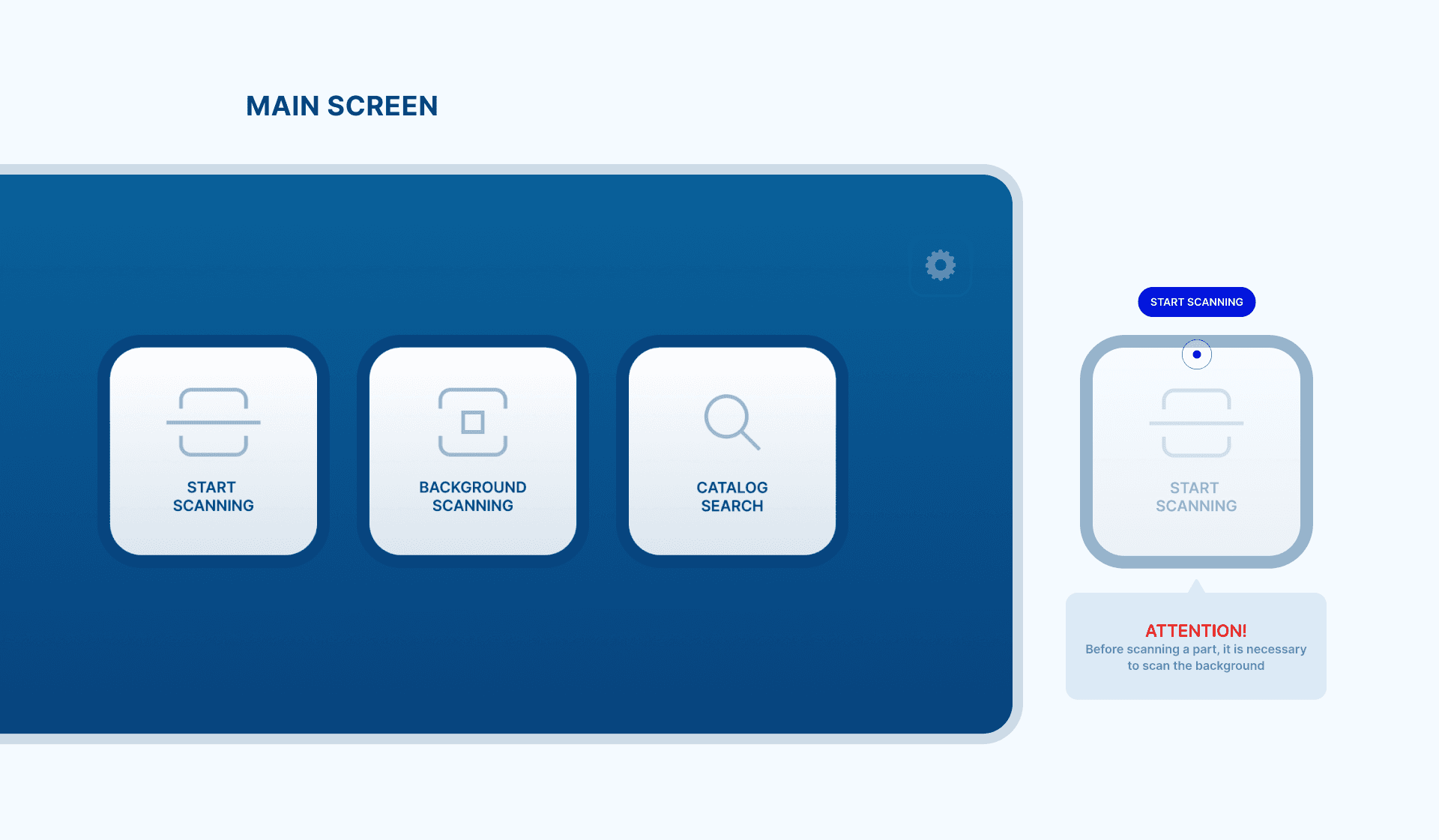
Making the First Action Obvious
The system needed to guide users immediately.
UX Decision:
A clean main screen with only 3 primary actions:
Why?
Operators should never wonder what to do next. Fewer choices = fewer mistakes.
GRANULAR DESIGN DECISION #2
Designing the Scanning Experience
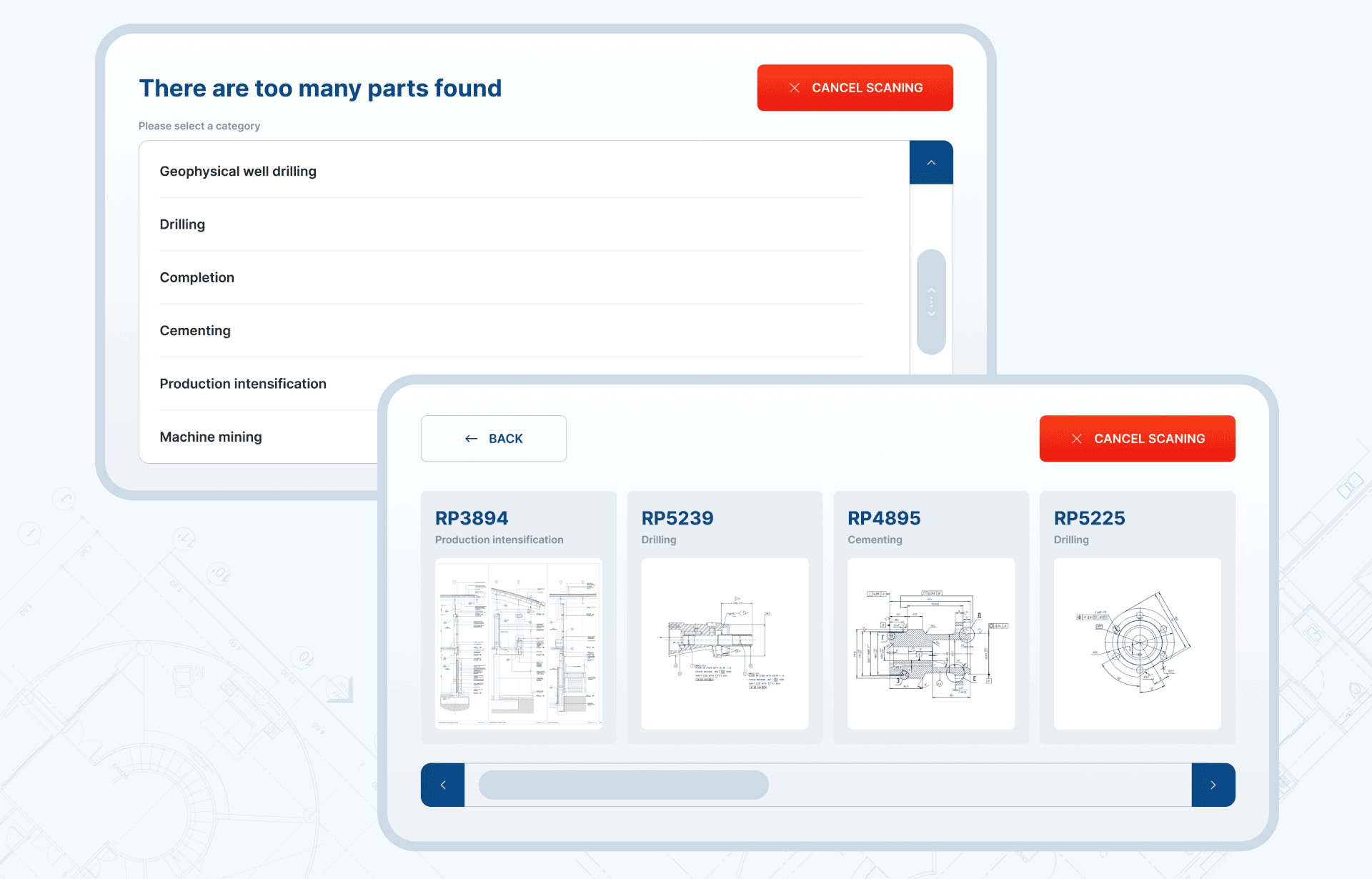
Scanning doesn’t always return a single result. Sometimes, multiple parts match.
Problem:
Too many results can overwhelm users and slow decisions.
UX Solution:
Clear system feedback: “Too many parts found”
Category selection to narrow results
Prominent “Cancel Scanning” option
Why?
This helped users recover quickly without frustration.
GRANULAR DESIGN DECISION #3
Search & Filtering as a Backup Flow
When scanning wasn’t enough, operators needed a fast manual fallback.
UX Decisions:
Filters by category, weight, and part number
Visual thumbnails instead of text-heavy lists
Clear separation between filters and results
Why?
This reduced mental effort and supported recognition over recall.
GRANULAR DESIGN DECISION #4
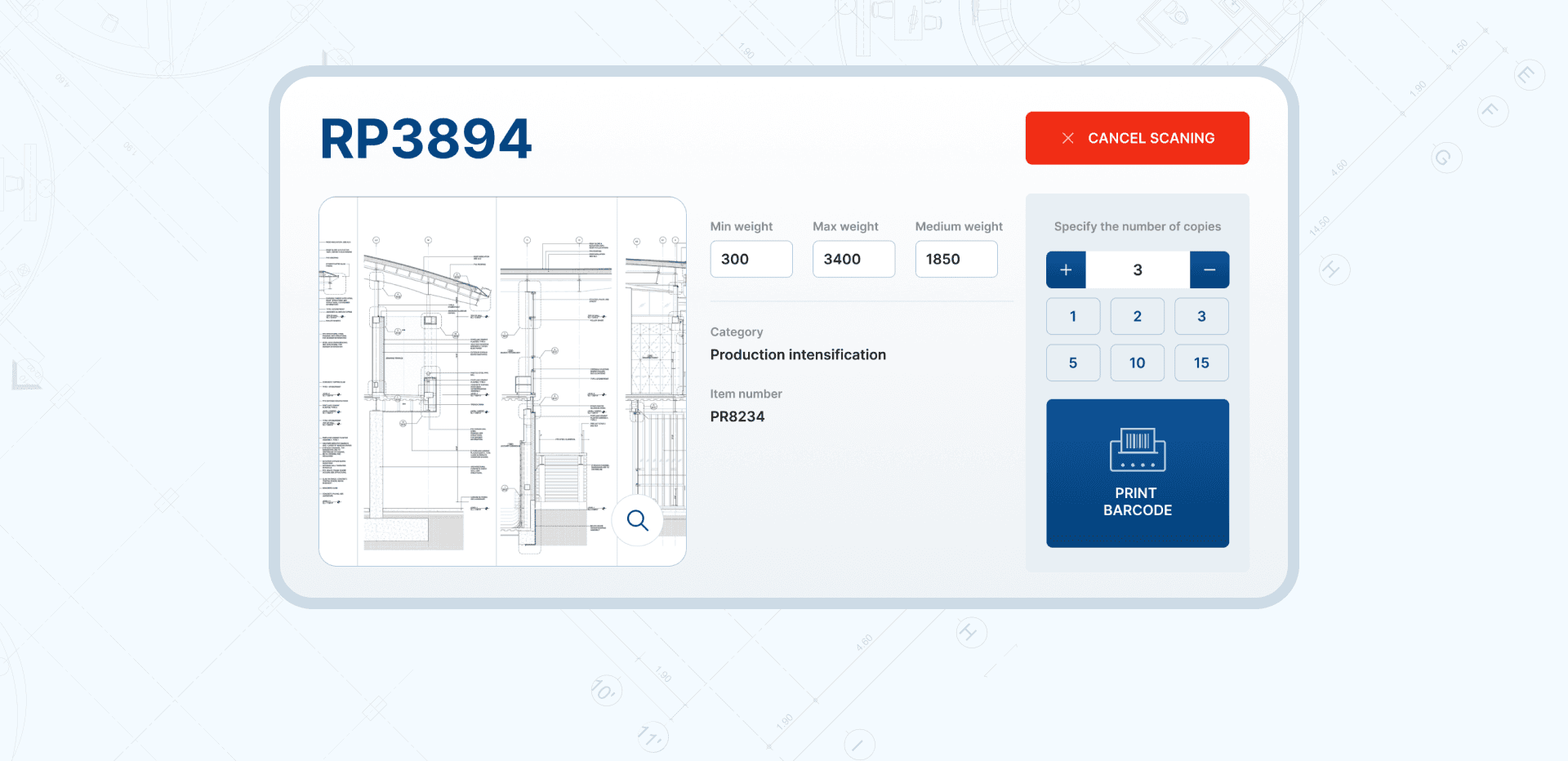
The Part Detail Screen
This screen determines whether the correct part gets labeled.
Key UX Considerations:
Engineering drawings presented clearly with zoom
Weight ranges shown for quick verification
Large, high-contrast “Print Barcode” CTA
Copy count selection designed to prevent errors
Design focus:
Accuracy and confidence — not speed alone.
GRANULAR DESIGN DECISION #5
Reference & Help Within the System
Operators shouldn’t need manuals or external help.
UX Solution:
Embedded reference screens
Scrollable, readable documentation
Accessible without leaving the workflow
Why?
This supported both new and experienced users.
///
///
PROJECT TAKEAWAYS
01
Good UX is critical even in highly technical systems
//
02
Industrial UX prioritizes error prevention over aesthetics
//
03
Designing with engineers early prevents usability issues later
//